Outlier Detection and NHS Icons
outlier_detection.RmdIntroduction
Statistical Process Control (SPC) charts are powerful tools for
detecting signals of change in processes over time. The
controlcharts package provides comprehensive outlier
detection capabilities to help identify when a process has shifted from
its baseline state.
This vignette demonstrates:
- Four outlier detection methods: astronomical points, shifts, trends, and 2-in-3 patterns
- Custom detection parameters: adjusting sensitivity for shift and trend lengths
- Directional flagging: specifying what constitutes improvement vs deterioration
- NHS icons: variation and assurance icons for visual interpretation
- Combined approaches: using multiple detection methods simultaneously
All outlier detection settings are configured through the
outlier_settings parameter, while NHS icons are configured
through the nhs_icon_settings parameter.
Outlier Detection Methods
Astronomical Points
Astronomical points (also called astronomical signals or special cause variation) are individual data points that fall outside the statistical control limits. By default, these are points beyond the 3-sigma limits.
# Create data with some extreme outliers
dat_astro <- data.frame(
  month = seq(as.Date("2024-01-01"), length.out = 24, by = "month"),
  infections = c(rnorm(10, mean = 15, sd = 3),
                 28,  # Astronomical point
                 rnorm(5, mean = 15, sd = 3),
                 6,   # Astronomical point
                 rnorm(7, mean = 15, sd = 3))
)
chart_astro <- spc(data = dat_astro,
                   keys = month,
                   numerators = infections,
                   spc_settings = list(chart_type = "i"),
                   outlier_settings = list(
                     astronomical = TRUE,
                     astronomical_limit = "3 Sigma"
                   ))

chart_astro$static_plot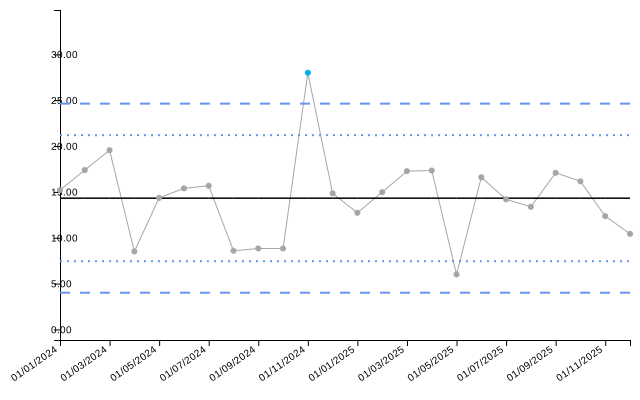
knitr::kable(chart_astro$limits[9:14, ], digits = 2)| date | value | target | ll99 | ll95 | ll68 | ul68 | ul95 | ul99 | trend_line | astpoint | |
|---|---|---|---|---|---|---|---|---|---|---|---|
| 9 | 01/09/2024 | 8.83 | 14.32 | 4.01 | 7.44 | 10.88 | 17.76 | 21.19 | 24.63 | 14.50 | none |
| 10 | 01/10/2024 | 8.83 | 14.32 | 4.01 | 7.44 | 10.88 | 17.76 | 21.19 | 24.63 | 14.45 | none |
| 11 | 01/11/2024 | 28.00 | 14.32 | 4.01 | 7.44 | 10.88 | 17.76 | 21.19 | 24.63 | 14.39 | improvement |
| 12 | 01/12/2024 | 14.84 | 14.32 | 4.01 | 7.44 | 10.88 | 17.76 | 21.19 | 24.63 | 14.34 | none |
| 13 | 01/01/2025 | 12.73 | 14.32 | 4.01 | 7.44 | 10.88 | 17.76 | 21.19 | 24.63 | 14.29 | none |
| 14 | 01/02/2025 | 14.97 | 14.32 | 4.01 | 7.44 | 10.88 | 17.76 | 21.19 | 24.63 | 14.24 | none |
Astronomical points indicate special cause variation - something
unusual has occurred that requires investigation. You can adjust the
which limit is used for flagging by changing the
astronomical_limit parameter to “2 Sigma” or “1 Sigma”:
chart_astro_2s <- spc(data = dat_astro,
                      keys = month,
                      numerators = infections,
                      spc_settings = list(chart_type = "i"),
                      outlier_settings = list(
                        astronomical = TRUE,
                        astronomical_limit = "2 Sigma"
                      ))

chart_astro_2s$static_plot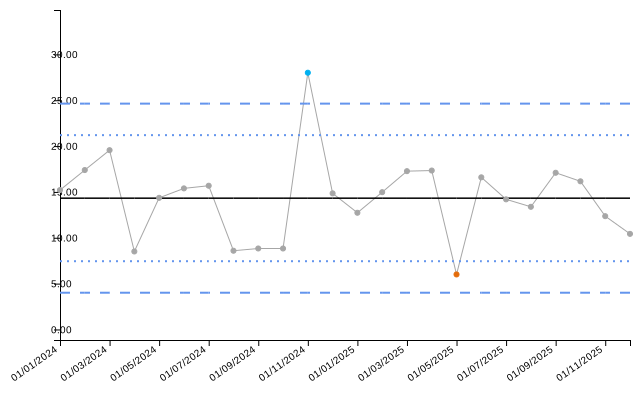
Shift Detection
A shift occurs when multiple consecutive points fall on the same side of the centerline, suggesting a sustained change in the process. The default threshold is 7 consecutive points. This example shows a 6-point shift, which will not be flagged with the default setting:
# Create data with a 6-point shift at the end
dat_shift <- data.frame(
  month = seq(as.Date("2024-01-01"), length.out = 24, by = "month"),
  satisfaction = c(rnorm(18, mean = 75, sd = 5),  # Baseline
                   rnorm(6, mean = 82, sd = 5))   # 6-point shift at end
)
chart_shift <- spc(data = dat_shift,
                   keys = month,
                   numerators = satisfaction,
                   spc_settings = list(chart_type = "i"),
                   outlier_settings = list(
                     shift = TRUE
                   ))

chart_shift$static_plot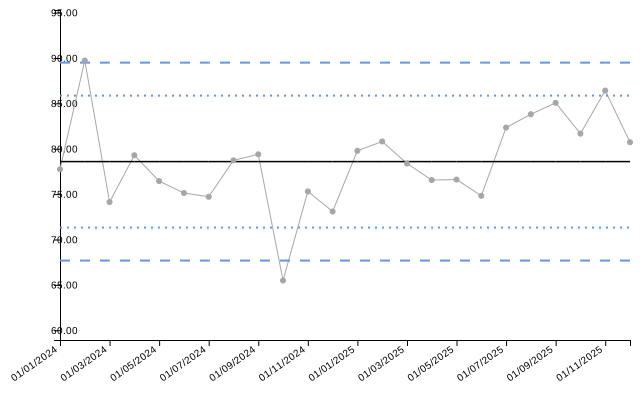
| date | value | target | ll99 | ll95 | ll68 | ul68 | ul95 | ul99 | trend_line | shift | |
|---|---|---|---|---|---|---|---|---|---|---|---|
| 15 | 01/03/2025 | 78.37 | 78.58 | 67.68 | 71.31 | 74.95 | 82.22 | 85.85 | 89.49 | 79.12 | none |
| 16 | 01/04/2025 | 76.55 | 78.58 | 67.68 | 71.31 | 74.95 | 82.22 | 85.85 | 89.49 | 79.34 | none |
| 17 | 01/05/2025 | 76.60 | 78.58 | 67.68 | 71.31 | 74.95 | 82.22 | 85.85 | 89.49 | 79.55 | none |
| 18 | 01/06/2025 | 74.81 | 78.58 | 67.68 | 71.31 | 74.95 | 82.22 | 85.85 | 89.49 | 79.77 | none |
| 19 | 01/07/2025 | 82.33 | 78.58 | 67.68 | 71.31 | 74.95 | 82.22 | 85.85 | 89.49 | 79.98 | none |
| 20 | 01/08/2025 | 83.81 | 78.58 | 67.68 | 71.31 | 74.95 | 82.22 | 85.85 | 89.49 | 80.20 | none |
| 21 | 01/09/2025 | 85.06 | 78.58 | 67.68 | 71.31 | 74.95 | 82.22 | 85.85 | 89.49 | 80.41 | none |
| 22 | 01/10/2025 | 81.67 | 78.58 | 67.68 | 71.31 | 74.95 | 82.22 | 85.85 | 89.49 | 80.63 | none |
| 23 | 01/11/2025 | 86.41 | 78.58 | 67.68 | 71.31 | 74.95 | 82.22 | 85.85 | 89.49 | 80.84 | none |
| 24 | 01/12/2025 | 80.72 | 78.58 | 67.68 | 71.31 | 74.95 | 82.22 | 85.85 | 89.49 | 81.06 | none |
You can customize the shift detection by changing
shift_n. Setting it to 5 or 6 will now detect the 6-point
shift:
chart_shift_6 <- spc(data = dat_shift,
                     keys = month,
                     numerators = satisfaction,
                     spc_settings = list(chart_type = "i"),
                     outlier_settings = list(
                       shift = TRUE,
                       shift_n = 6
                     ))

chart_shift_6$static_plot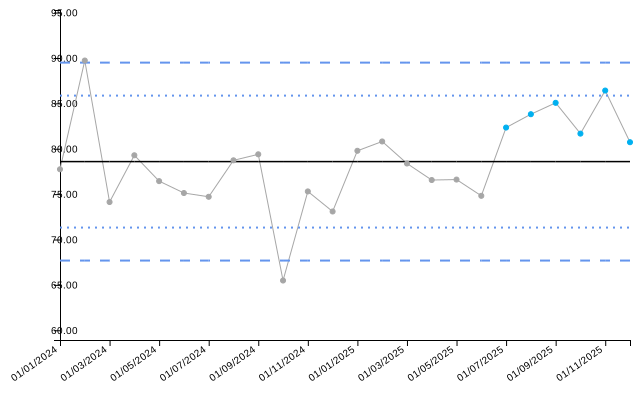
Trend Detection
Trends detect monotonic increases or decreases over consecutive points, indicating a sustained directional change. The default is 5 consecutive points in a consistent direction. This example shows a 4-point trend, which will not be flagged with the default setting:
# Create data with a 4-point upward trend at the end
dat_trend <- data.frame(
  month = seq(as.Date("2024-01-01"), length.out = 24, by = "month"),
  wait_time = c(rnorm(20, mean = 30, sd = 3),
                31, 33, 35, 37)  # 4-point increasing trend at end
)
chart_trend <- spc(data = dat_trend,
                   keys = month,
                   numerators = wait_time,
                   spc_settings = list(chart_type = "i"),
                   outlier_settings = list(
                     trend = TRUE
                   ))

chart_trend$static_plot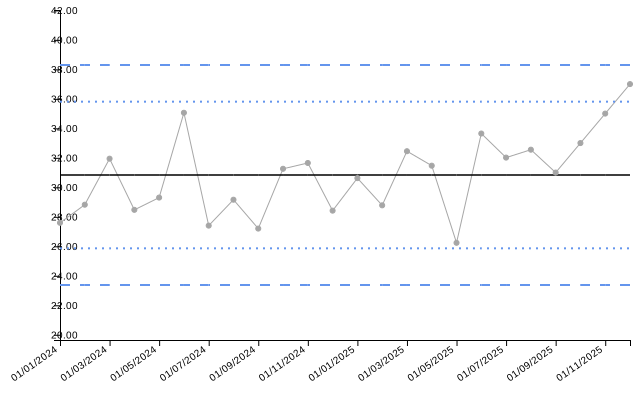
| date | value | target | ll99 | ll95 | ll68 | ul68 | ul95 | ul99 | trend_line | trend | |
|---|---|---|---|---|---|---|---|---|---|---|---|
| 15 | 01/03/2025 | 32.45 | 30.84 | 23.38 | 25.86 | 28.35 | 33.32 | 35.81 | 38.3 | 31.37 | none |
| 16 | 01/04/2025 | 31.47 | 30.84 | 23.38 | 25.86 | 28.35 | 33.32 | 35.81 | 38.3 | 31.58 | none |
| 17 | 01/05/2025 | 26.24 | 30.84 | 23.38 | 25.86 | 28.35 | 33.32 | 35.81 | 38.3 | 31.79 | none |
| 18 | 01/06/2025 | 33.65 | 30.84 | 23.38 | 25.86 | 28.35 | 33.32 | 35.81 | 38.3 | 32.01 | none |
| 19 | 01/07/2025 | 32.02 | 30.84 | 23.38 | 25.86 | 28.35 | 33.32 | 35.81 | 38.3 | 32.22 | none |
| 20 | 01/08/2025 | 32.55 | 30.84 | 23.38 | 25.86 | 28.35 | 33.32 | 35.81 | 38.3 | 32.43 | none |
| 21 | 01/09/2025 | 31.00 | 30.84 | 23.38 | 25.86 | 28.35 | 33.32 | 35.81 | 38.3 | 32.65 | none |
| 22 | 01/10/2025 | 33.00 | 30.84 | 23.38 | 25.86 | 28.35 | 33.32 | 35.81 | 38.3 | 32.86 | none |
| 23 | 01/11/2025 | 35.00 | 30.84 | 23.38 | 25.86 | 28.35 | 33.32 | 35.81 | 38.3 | 33.07 | none |
| 24 | 01/12/2025 | 37.00 | 30.84 | 23.38 | 25.86 | 28.35 | 33.32 | 35.81 | 38.3 | 33.29 | none |
Setting trend_n to 4 or fewer will now detect the
4-point trend:
chart_trend_4 <- spc(data = dat_trend,
                     keys = month,
                     numerators = wait_time,
                     spc_settings = list(chart_type = "i"),
                     outlier_settings = list(
                       trend = TRUE,
                       trend_n = 4
                     ))

chart_trend_4$static_plot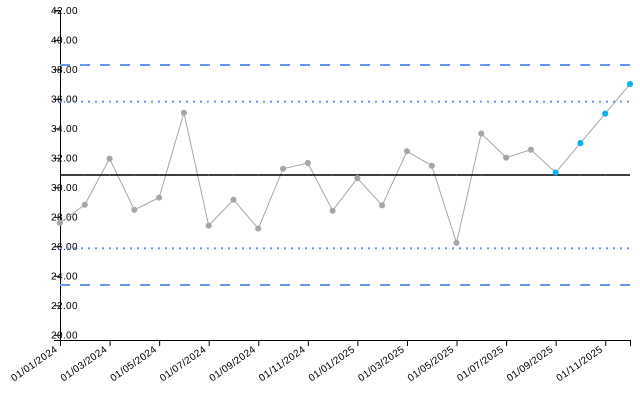
Two-in-Three Detection
The 2-in-3 rule detects when 2 out of any 3 consecutive points fall outside the 2-sigma (95%) warning limits. This pattern suggests early signs of process change.
# Create data with 2-in-3 pattern
# With mean=120 and sd=5, 2-sigma limits are approximately 120 ± 10
# So values above 130 or below 110 should exceed 2-sigma
dat_2in3 <- data.frame(
  month = seq(as.Date("2024-01-01"), length.out = 24, by = "month"),
  pressure = c(rnorm(8, mean = 120, sd = 5),
               131, 133, 121,  # 2 out of 3 outside 2-sigma (131 and 133 > 130)
               rnorm(13, mean = 120, sd = 5))
)
chart_2in3 <- spc(data = dat_2in3,
                  keys = month,
                  numerators = pressure,
                  spc_settings = list(chart_type = "i"),
                  outlier_settings = list(
                    two_in_three = TRUE,
                    two_in_three_limit = "2 Sigma"
                  ))

chart_2in3$static_plot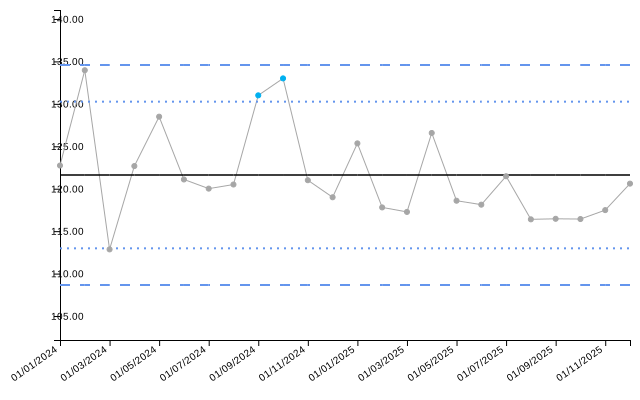
| date | value | target | ll99 | ll95 | ll68 | ul68 | ul95 | ul99 | trend_line | two_in_three |
|---|---|---|---|---|---|---|---|---|---|---|
| 01/01/2024 | 122.73 | 121.62 | 108.66 | 112.98 | 117.3 | 125.94 | 130.26 | 134.58 | 125.42 | none |
| 01/02/2024 | 133.96 | 121.62 | 108.66 | 112.98 | 117.3 | 125.94 | 130.26 | 134.58 | 125.09 | none |
| 01/03/2024 | 112.85 | 121.62 | 108.66 | 112.98 | 117.3 | 125.94 | 130.26 | 134.58 | 124.76 | none |
| 01/04/2024 | 122.67 | 121.62 | 108.66 | 112.98 | 117.3 | 125.94 | 130.26 | 134.58 | 124.43 | none |
| 01/05/2024 | 128.49 | 121.62 | 108.66 | 112.98 | 117.3 | 125.94 | 130.26 | 134.58 | 124.09 | none |
| 01/06/2024 | 121.09 | 121.62 | 108.66 | 112.98 | 117.3 | 125.94 | 130.26 | 134.58 | 123.76 | none |
| 01/07/2024 | 120.01 | 121.62 | 108.66 | 112.98 | 117.3 | 125.94 | 130.26 | 134.58 | 123.43 | none |
| 01/08/2024 | 120.50 | 121.62 | 108.66 | 112.98 | 117.3 | 125.94 | 130.26 | 134.58 | 123.10 | none |
| 01/09/2024 | 131.00 | 121.62 | 108.66 | 112.98 | 117.3 | 125.94 | 130.26 | 134.58 | 122.77 | improvement |
| 01/10/2024 | 133.00 | 121.62 | 108.66 | 112.98 | 117.3 | 125.94 | 130.26 | 134.58 | 122.44 | improvement |
| 01/11/2024 | 121.00 | 121.62 | 108.66 | 112.98 | 117.3 | 125.94 | 130.26 | 134.58 | 122.11 | none |
| 01/12/2024 | 118.99 | 121.62 | 108.66 | 112.98 | 117.3 | 125.94 | 130.26 | 134.58 | 121.78 | none |
By default, only the points outside the limits are highlighted. You
can highlight all points in the pattern by setting
two_in_three_highlight_series = TRUE:
chart_2in3_all <- spc(data = dat_2in3,
                      keys = month,
                      numerators = pressure,
                      spc_settings = list(chart_type = "i"),
                      outlier_settings = list(
                        two_in_three = TRUE,
                        two_in_three_limit = "2 Sigma",
                        two_in_three_highlight_series = TRUE
                      ))

chart_2in3_all$static_plot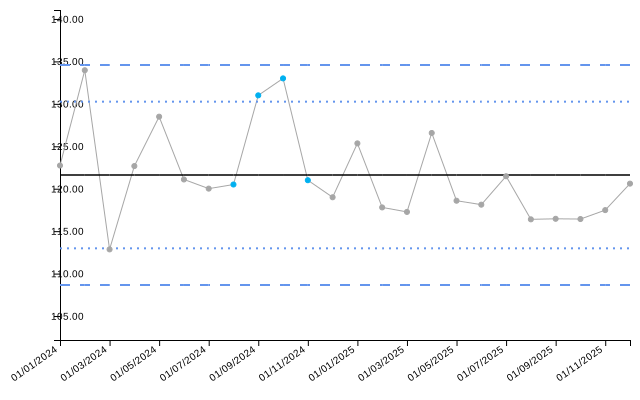
Improvement Direction and Flag Types
Improvement Direction
The improvement_direction setting specifies what
constitutes an improvement in your process.
# For metrics where lower is better (e.g., infection rates)
dat_infections <- data.frame(
  month = seq(as.Date("2024-01-01"), length.out = 24, by = "month"),
  infections = c(rnorm(16, mean = 10, sd = 1),
                 rnorm(8, mean = 5, sd = 1))  # Improvement (decrease shift)
)

chart_inf <- spc(data = dat_infections,
                 keys = month,
                 numerators = infections,
                 spc_settings = list(chart_type = "i"),
                 outlier_settings = list(
                   shift = TRUE,
                   improvement_direction = "decrease"
                 ))

chart_inf$static_plot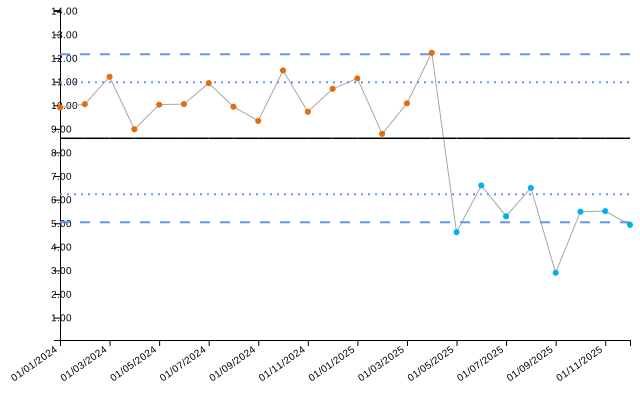
# For metrics where higher is better (e.g., hand hygiene compliance)
dat_compliance <- data.frame(
  month = seq(as.Date("2024-01-01"), length.out = 24, by = "month"),
  compliance = c(rnorm(12, mean = 75, sd = 5),
                 rnorm(12, mean = 85, sd = 5))  # Improvement (increase)
)

chart_comp <- spc(data = dat_compliance,
                  keys = month,
                  numerators = compliance,
                  spc_settings = list(chart_type = "i"),
                  outlier_settings = list(
                    shift = TRUE,
                    improvement_direction = "increase"
                  ))

chart_comp$static_plot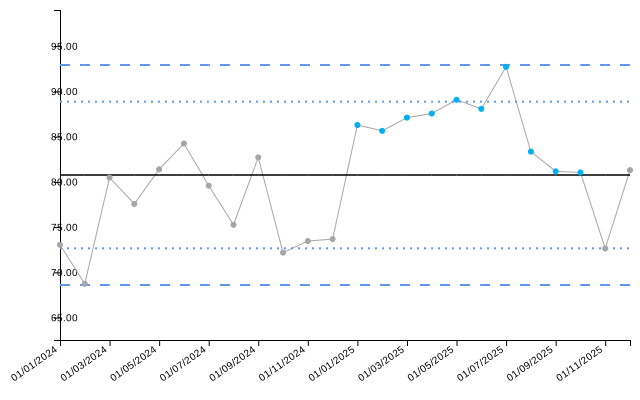
Setting improvement_direction = "neutral" treats all
outliers equally, with no distinction between improvement and
deterioration.
Process Flag Type
The process_flag_type setting allows you to filter which
outliers are flagged. This is useful when you only want to be alerted to
deteriorations (not improvements) or vice versa.
First, let’s create data with both an improvement (decrease) and a deterioration (increase) in infection rates:
# Data with both improvement and deterioration
dat_flag_type <- data.frame(
  month = seq(as.Date("2024-01-01"), length.out = 24, by = "month"),
  infections = c(rnorm(5, mean = 8, sd = 1.5),
                 rnorm(8, mean = 5, sd = 1.5),   # Improvement (decrease)
                 rnorm(11, mean = 10, sd = 1.5))  # Deterioration (increase)
)
With the default setting (process_flag_type = "both"),
both the improvement and deterioration shifts are flagged:
chart_both <- spc(data = dat_flag_type,
                  keys = month,
                  numerators = infections,
                  spc_settings = list(chart_type = "i"),
                  outlier_settings = list(
                    shift = TRUE,
                    improvement_direction = "decrease",
                    process_flag_type = "both"
                  ))

chart_both$static_plot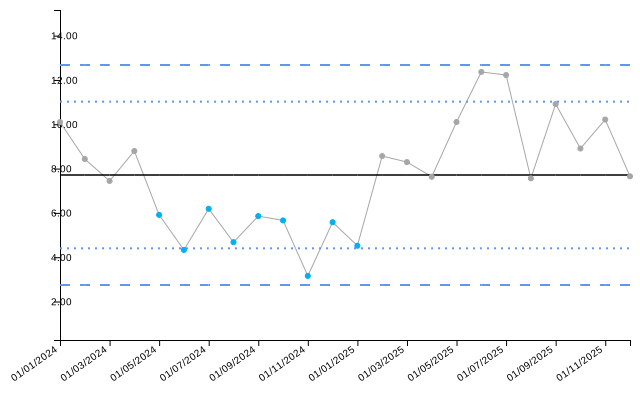
Now, setting process_flag_type = "deterioration" will
only flag the increase (deterioration), ignoring the improvement:
chart_det_only <- spc(data = dat_flag_type,
                      keys = month,
                      numerators = infections,
                      spc_settings = list(chart_type = "i"),
                      outlier_settings = list(
                        shift = TRUE,
                        improvement_direction = "decrease",
                        process_flag_type = "deterioration"
                      ))

chart_det_only$static_plot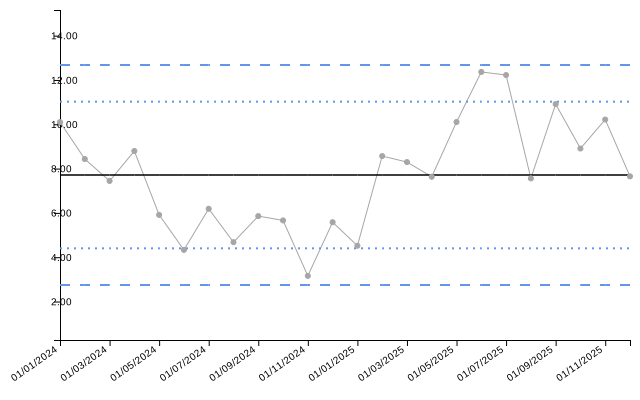
NHS Icons
NHS icons provide standardized visual indicators of process variation and assurance status.
Variation Icons
Variation icons indicate the type of variation present in the chart. By default, icons are only shown if a pattern is detected at the last point:
# Data with shift ending at the last point
dat_var_last <- data.frame(
  month = seq(as.Date("2024-01-01"), length.out = 24, by = "month"),
  readmissions = c(rnorm(10, mean = 12, sd = 2),
                   rnorm(14, mean = 16, sd = 2))  # Shift at end
)

chart_var_last <- spc(data = dat_var_last,
                      keys = month,
                      numerators = readmissions,
                      spc_settings = list(chart_type = "i"),
                      outlier_settings = list(
                        astronomical = TRUE,
                        shift = TRUE,
                        improvement_direction = "decrease"
                      ),
                      nhs_icon_settings = list(
                        show_variation_icons = TRUE,
                        flag_last_point = TRUE,
                        variation_icons_locations = "Top Right"
                      ))

chart_var_last$static_plot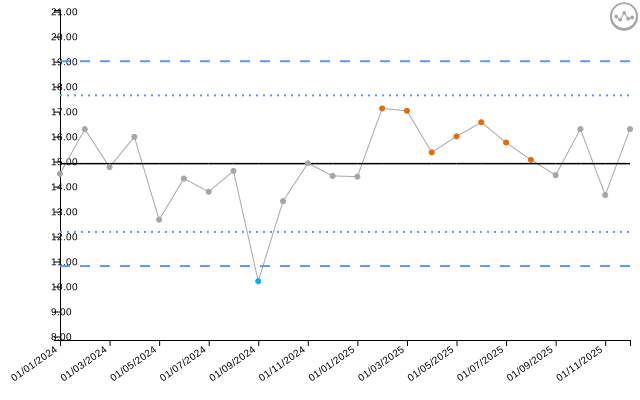
If the pattern occurs earlier in the data but not at the last point, the icon will not be shown with default settings:
# Data with shift in the middle, not at the end
dat_var_middle <- data.frame(
  month = seq(as.Date("2024-01-01"), length.out = 24, by = "month"),
  readmissions = c(rnorm(8, mean = 12, sd = 2),
                   rnorm(8, mean = 16, sd = 2),  # Shift in middle
                   rnorm(8, mean = 12, sd = 2))  # Back to baseline
)

chart_var_middle <- spc(data = dat_var_middle,
                        keys = month,
                        numerators = readmissions,
                        spc_settings = list(chart_type = "i"),
                        outlier_settings = list(
                          astronomical = TRUE,
                          shift = TRUE,
                          improvement_direction = "decrease"
                        ),
                        nhs_icon_settings = list(
                          show_variation_icons = TRUE,
                          flag_last_point = TRUE,
                          variation_icons_locations = "Top Right"
                        ))

chart_var_middle$static_plot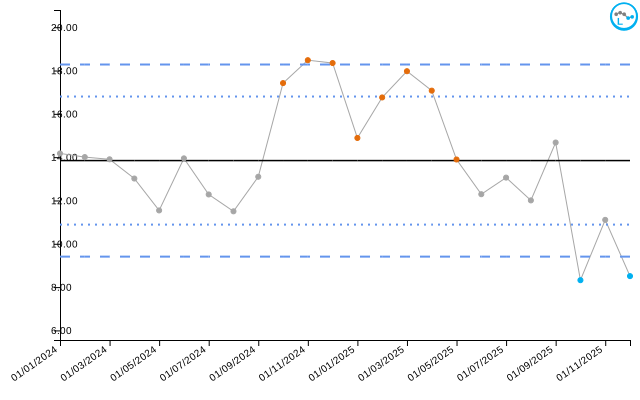
Setting flag_last_point = FALSE will show icons for all
relevant points, not just the last observation:
chart_var_all <- spc(data = dat_var_middle,
                     keys = month,
                     numerators = readmissions,
                     spc_settings = list(chart_type = "i"),
                     outlier_settings = list(
                       astronomical = TRUE,
                       shift = TRUE,
                       improvement_direction = "decrease"
                     ),
                     nhs_icon_settings = list(
                       show_variation_icons = TRUE,
                       flag_last_point = FALSE,
                       variation_icons_locations = "Top Right"
                     ))

chart_var_all$static_plot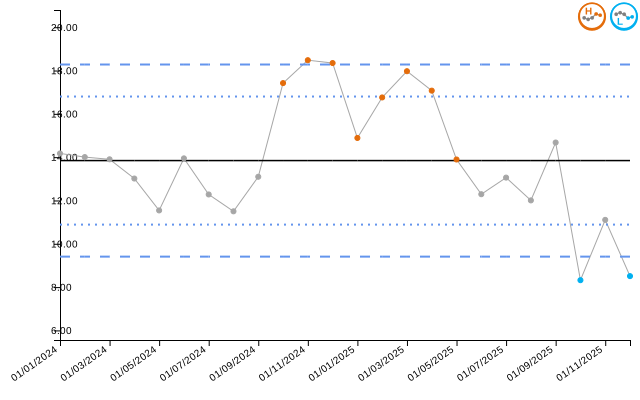
You can also customize the icon placement and scaling:
chart_var_bl <- spc(data = dat_var_last,
                    keys = month,
                    numerators = readmissions,
                    spc_settings = list(chart_type = "i"),
                    outlier_settings = list(
                      astronomical = TRUE,
                      shift = TRUE,
                      improvement_direction = "decrease"
                    ),
                    nhs_icon_settings = list(
                      show_variation_icons = TRUE,
                      variation_icons_locations = "Bottom Left",
                      variation_icons_scaling = 1.2
                    ))

chart_var_bl$static_plot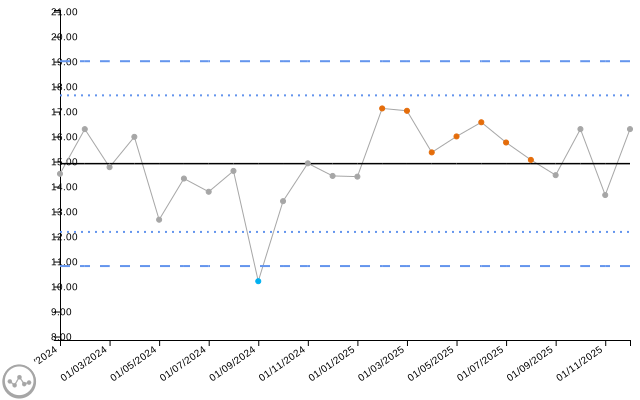
Assurance Icons
Assurance icons indicate whether the process is consistently meeting
a target threshold. Important: Assurance icons require
an alt_target value to be specified in
line_settings.
The assurance status depends on the position of the
alt_target relative to the 99% control limits:
- Consistent Pass: Target is below the lower 99% limit (process consistently exceeds target)
- Consistent Fail: Target is above the upper 99% limit (process consistently below target)
- Variable: Target is within the 99% limits (process sometimes meets, sometimes doesn’t)
Example: Consistent Pass
When the alt_target is below the lower 99% control
limit, the process consistently exceeds the target:
# Process centered around 95%, target at 90% will be below lower 99% limit
dat_assurance_pass <- data.frame(
  month = seq(as.Date("2024-01-01"), length.out = 24, by = "month"),
  vaccination_rate = rnorm(24, mean = 95, sd = 1)
)

chart_assurance_pass <- spc(data = dat_assurance_pass,
                            keys = month,
                            numerators = vaccination_rate,
                            spc_settings = list(chart_type = "i"),
                            nhs_icon_settings = list(
                              show_assurance_icons = TRUE,
                              assurance_icons_locations = "Top Right"
                            ),
                            line_settings = list(
                              show_alt_target = TRUE,
                              alt_target = 90,
                              colour_alt_target = "#E69F00"
                            ))

chart_assurance_pass$static_plot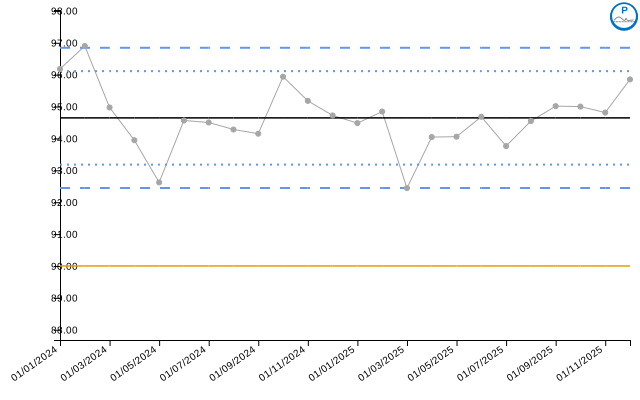
| date | value | target | alt_target | ll99 | ll95 | ll68 | ul68 | ul95 | ul99 | trend_line | |
|---|---|---|---|---|---|---|---|---|---|---|---|
| 19 | 01/07/2025 | 93.76 | 94.64 | 90 | 92.45 | 93.18 | 93.91 | 95.38 | 96.11 | 96.84 | 94.55 |
| 20 | 01/08/2025 | 94.54 | 94.64 | 90 | 92.45 | 93.18 | 93.91 | 95.38 | 96.11 | 96.84 | 94.53 |
| 21 | 01/09/2025 | 95.01 | 94.64 | 90 | 92.45 | 93.18 | 93.91 | 95.38 | 96.11 | 96.84 | 94.52 |
| 22 | 01/10/2025 | 95.00 | 94.64 | 90 | 92.45 | 93.18 | 93.91 | 95.38 | 96.11 | 96.84 | 94.50 |
| 23 | 01/11/2025 | 94.81 | 94.64 | 90 | 92.45 | 93.18 | 93.91 | 95.38 | 96.11 | 96.84 | 94.49 |
| 24 | 01/12/2025 | 95.85 | 94.64 | 90 | 92.45 | 93.18 | 93.91 | 95.38 | 96.11 | 96.84 | 94.48 |
Example: Consistent Fail
When the alt_target is above the upper 99% control
limit, the process consistently fails to meet the target:
# Process centered around 82%, target at 90% will be above upper 99% limit
dat_assurance_fail <- data.frame(
  month = seq(as.Date("2024-01-01"), length.out = 24, by = "month"),
  vaccination_rate = rnorm(24, mean = 82, sd = 1.5)
)

chart_assurance_fail <- spc(data = dat_assurance_fail,
                            keys = month,
                            numerators = vaccination_rate,
                            spc_settings = list(chart_type = "i"),
                            nhs_icon_settings = list(
                              show_assurance_icons = TRUE,
                              assurance_icons_locations = "Top Right"
                            ),
                            line_settings = list(
                              show_alt_target = TRUE,
                              alt_target = 90,
                              colour_alt_target = "#E69F00"
                            ))

chart_assurance_fail$static_plot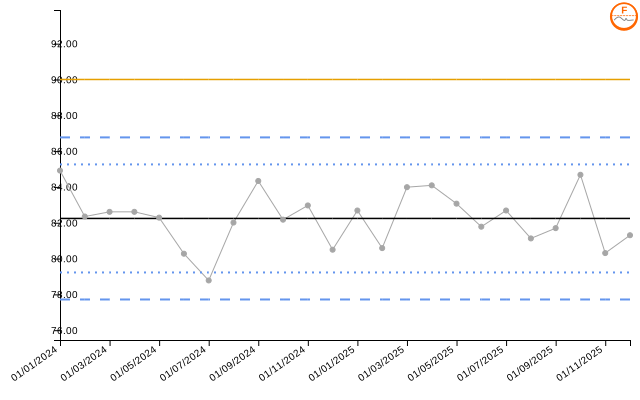
| date | value | target | alt_target | ll99 | ll95 | ll68 | ul68 | ul95 | ul99 | trend_line | |
|---|---|---|---|---|---|---|---|---|---|---|---|
| 19 | 01/07/2025 | 82.68 | 82.24 | 90 | 77.71 | 79.22 | 80.73 | 83.75 | 85.26 | 86.77 | 82.12 |
| 20 | 01/08/2025 | 81.12 | 82.24 | 90 | 77.71 | 79.22 | 80.73 | 83.75 | 85.26 | 86.77 | 82.10 |
| 21 | 01/09/2025 | 81.70 | 82.24 | 90 | 77.71 | 79.22 | 80.73 | 83.75 | 85.26 | 86.77 | 82.08 |
| 22 | 01/10/2025 | 84.68 | 82.24 | 90 | 77.71 | 79.22 | 80.73 | 83.75 | 85.26 | 86.77 | 82.06 |
| 23 | 01/11/2025 | 80.31 | 82.24 | 90 | 77.71 | 79.22 | 80.73 | 83.75 | 85.26 | 86.77 | 82.04 |
| 24 | 01/12/2025 | 81.30 | 82.24 | 90 | 77.71 | 79.22 | 80.73 | 83.75 | 85.26 | 86.77 | 82.02 |
Example: Variable Performance
When the alt_target falls within the 99% control limits,
performance is variable:
# Process centered around 90%, target at 90% will be within limits
dat_assurance_variable <- data.frame(
  month = seq(as.Date("2024-01-01"), length.out = 24, by = "month"),
  vaccination_rate = rnorm(24, mean = 90, sd = 2)
)

chart_assurance_variable <- spc(data = dat_assurance_variable,
                                keys = month,
                                numerators = vaccination_rate,
                                spc_settings = list(chart_type = "i"),
                                nhs_icon_settings = list(
                                  show_assurance_icons = TRUE,
                                  assurance_icons_locations = "Top Right"
                                ),
                                line_settings = list(
                                  show_alt_target = TRUE,
                                  alt_target = 90,
                                  colour_alt_target = "#E69F00"
                                ))

chart_assurance_variable$static_plot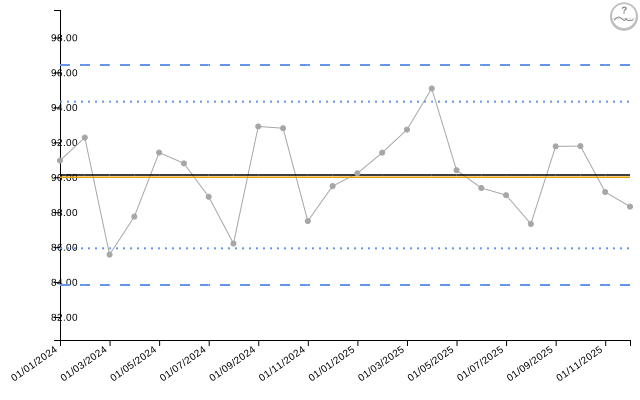
| date | value | target | alt_target | ll99 | ll95 | ll68 | ul68 | ul95 | ul99 | trend_line | |
|---|---|---|---|---|---|---|---|---|---|---|---|
| 19 | 01/07/2025 | 88.97 | 90.13 | 90 | 83.83 | 85.93 | 88.03 | 92.23 | 94.33 | 96.43 | 90.26 |
| 20 | 01/08/2025 | 87.33 | 90.13 | 90 | 83.83 | 85.93 | 88.03 | 92.23 | 94.33 | 96.43 | 90.28 |
| 21 | 01/09/2025 | 91.77 | 90.13 | 90 | 83.83 | 85.93 | 88.03 | 92.23 | 94.33 | 96.43 | 90.30 |
| 22 | 01/10/2025 | 91.78 | 90.13 | 90 | 83.83 | 85.93 | 88.03 | 92.23 | 94.33 | 96.43 | 90.32 |
| 23 | 01/11/2025 | 89.15 | 90.13 | 90 | 83.83 | 85.93 | 88.03 | 92.23 | 94.33 | 96.43 | 90.34 |
| 24 | 01/12/2025 | 88.32 | 90.13 | 90 | 83.83 | 85.93 | 88.03 | 92.23 | 94.33 | 96.43 | 90.36 |
Combined Variation and Assurance Icons
You can display both icon types simultaneously:
chart_both_icons <- spc(data = dat_assurance_pass,
                        keys = month,
                        numerators = vaccination_rate,
                        spc_settings = list(chart_type = "i"),
                        outlier_settings = list(
                          astronomical = TRUE,
                          shift = TRUE,
                          trend = TRUE,
                          improvement_direction = "increase"
                        ),
                        nhs_icon_settings = list(
                          show_variation_icons = TRUE,
                          show_assurance_icons = TRUE
                        ),
                        line_settings = list(
                          show_alt_target = TRUE,
                          alt_target = 90,
                          colour_alt_target = "#E69F00"
                        ))

chart_both_icons$static_plot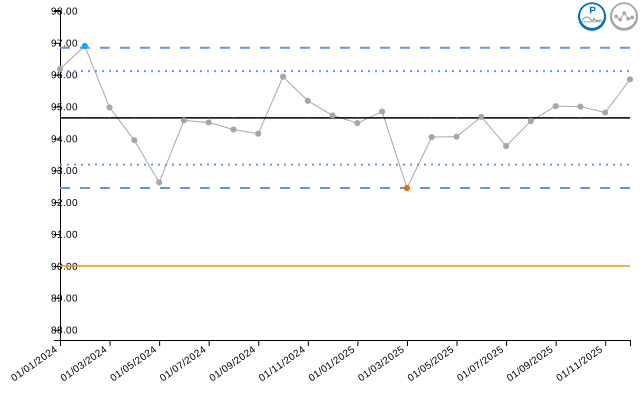
Settings Reference
Outlier Detection Settings
| Setting | Type | Default | Options/Range | Purpose |
|---|---|---|---|---|
astronomical |
boolean | FALSE | TRUE/FALSE | Detect points outside limits |
astronomical_limit |
character | “3 Sigma” | “1 Sigma”, “2 Sigma”, “3 Sigma”, “Specification” | Which limit to use |
shift |
boolean | FALSE | TRUE/FALSE | Detect runs on one side |
shift_n |
numeric | 7 | Min: 1 | Points needed for shift |
trend |
boolean | FALSE | TRUE/FALSE | Detect trends |
trend_n |
numeric | 5 | Min: 1 | Points needed for trend |
two_in_three |
boolean | FALSE | TRUE/FALSE | Detect 2-in-3 pattern |
two_in_three_limit |
character | “2 Sigma” | “1 Sigma”, “2 Sigma”, “3 Sigma”, “Specification” | Warning limit |
two_in_three_highlight_series |
boolean | FALSE | TRUE/FALSE | Highlight all vs outliers only |
improvement_direction |
character | “increase” | “increase”, “decrease”, “neutral” | What constitutes improvement |
process_flag_type |
character | “both” | “both”, “improvement”, “deterioration” | Which outliers to flag |
NHS Icon Settings
| Setting | Type | Default | Options/Range | Purpose |
|---|---|---|---|---|
show_variation_icons |
boolean | FALSE | TRUE/FALSE | Display variation icons |
flag_last_point |
boolean | TRUE | TRUE/FALSE | Icon on last point only |
variation_icons_locations |
character | “Top Right” | “Top Right”, “Bottom Right”, “Top Left”, “Bottom Left” | Icon placement |
variation_icons_scaling |
numeric | 1 | Min: 0 | Icon size multiplier |
show_assurance_icons |
boolean | FALSE | TRUE/FALSE | Display assurance icons |
assurance_icons_locations |
character | “Top Right” | “Top Right”, “Bottom Right”, “Top Left”, “Bottom Left” | Icon placement |
assurance_icons_scaling |
numeric | 1 | Min: 0 | Icon size multiplier |
Note: Assurance icons require
alt_target to be specified in
line_settings.
Additional Resources
For more information, see:
-
vignette("getting_started")- Basic package usage -
vignette("chart_types")- All available chart types -
vignette("interactive_charts")- Interactive features with crosstalk