Line Plot Aesthetics
With the line settings, users can modify the width, type and colour of the lines in the SPC chart. Each line type can be modified by selecting the different line type:
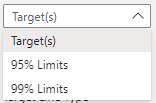
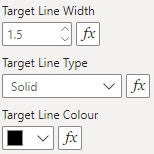
All Settings
Target
| Setting | Description | Default | Values |
|---|---|---|---|
| Show Target | Draws the centreline. | On | On or Off |
| Line Width | Line width, in pixels. | 1.5 | Number from 0 to 100 |
| Line Type | Dash pattern of the line. | Solid | • Solid (10 0)• Dashed ( 10 10)• Dotted ( 2 5) |
| Line Colour | Line colour. | #000000 |
Colour |
| Default Opacity | Line opacity while nothing is selected. | 1 | Number from 0 to 1 |
| Opacity if Any Selected | Line opacity while any point is selected. | 0.2 | Number from 0 to 1 |
| Show value in tooltip | Shows this line’s value in the tooltip while the line is shown. | On | On or Off |
| Tooltip Label | Names this line in tooltips and any summary table. | Centerline |
Text |
| Show Value on Plot | Writes the line’s value at its right-hand end. | Off | On or Off |
| Position of Value on Line(s) | Where the value sits at the line’s end. Outside is below lower limits and above other lines; inside is the reverse. | Beside | • Outside (outside)• Inside ( inside)• Above ( above)• Below ( below)• Beside ( beside) |
| Value Vertical Padding | Vertical offset of the value from the line, in pixels. | 0 | Number |
| Value Horizontal Padding | Horizontal gap between the value and the line’s end, in pixels. | 10 | Number |
| Value Font | Font of the value. | 'Arial', sans-serif |
Font family |
| Value Font Size | Font size of the value, in pixels. | 10 | Number from 0 to 100 |
| Value Colour | Colour of the value. | #000000 |
Colour |
| Value Prefix | Text written before the value. | (blank) | Text |
Alt. Target
| Setting | Description | Default | Values |
|---|---|---|---|
| Show Alt. Target Line | Draws a line at the Additional Target Value. | Off | On or Off |
| Additional Target Value: | Value of the target line, as a plotted value; the transformation applies but not the multiplier. | (blank) | Number |
| Line Width | Line width, in pixels. | 1.5 | Number from 0 to 100 |
| Line Type | Dash pattern of the line. | Solid | • Solid (10 0)• Dashed ( 10 10)• Dotted ( 2 5) |
| Line Colour | Line colour. | #000000 |
Colour |
| Default Opacity | Line opacity while nothing is selected. | 1 | Number from 0 to 1 |
| Opacity if Any Selected | Line opacity while any point is selected. | 0.2 | Number from 0 to 1 |
| Show value in tooltip | Shows this line’s value in the tooltip while the line is shown. | On | On or Off |
| Tooltip Label | Names this line in tooltips and any summary table. | Alt. Target |
Text |
| Show Value on Plot | Writes the line’s value at its right-hand end. | Off | On or Off |
| Position of Value on Line(s) | Where the value sits at the line’s end. Outside is below lower limits and above other lines; inside is the reverse. | Beside | • Outside (outside)• Inside ( inside)• Above ( above)• Below ( below)• Beside ( beside) |
| Value Vertical Padding | Vertical offset of the value from the line, in pixels. | 0 | Number |
| Value Horizontal Padding | Horizontal gap between the value and the line’s end, in pixels. | 10 | Number |
| Value Font | Font of the value. | 'Arial', sans-serif |
Font family |
| Value Font Size | Font size of the value, in pixels. | 10 | Number from 0 to 100 |
| Value Colour | Colour of the value. | #000000 |
Colour |
| Value Prefix | Text written before the value. | (blank) | Text |
68% Limits
| Setting | Description | Default | Values |
|---|---|---|---|
| Show 68% Lines | Draws the 68% limits. | Off | On or Off |
| Line Width | Line width, in pixels. | 2 | Number from 0 to 100 |
| Line Type | Dash pattern of the line. | Dotted | • Solid (10 0)• Dashed ( 10 10)• Dotted ( 2 5) |
| Line Colour | Line colour. | #6495ED |
Colour |
| Default Opacity | Line opacity while nothing is selected. | 1 | Number from 0 to 1 |
| Opacity if Any Selected | Line opacity while any point is selected. | 0.2 | Number from 0 to 1 |
| Show value in tooltip | Shows this line’s value in the tooltip while the line is shown. | On | On or Off |
| Tooltip Label | Names this line in tooltips and any summary table. | 68% Limit |
Text |
| Tooltip Label - Lower Prefix | Text before the tooltip label for the lower line. | Lower |
Text |
| Tooltip Label - Upper Prefix | Text before the tooltip label for the upper line. | Upper |
Text |
| Show Value on Plot | Writes the line’s value at its right-hand end. | Off | On or Off |
| Position of Value on Line(s) | Where the value sits at the line’s end. Outside is below lower limits and above other lines; inside is the reverse. | Beside | • Outside (outside)• Inside ( inside)• Above ( above)• Below ( below)• Beside ( beside) |
| Value Vertical Padding | Vertical offset of the value from the line, in pixels. | 0 | Number |
| Value Horizontal Padding | Horizontal gap between the value and the line’s end, in pixels. | 10 | Number |
| Value Font | Font of the value. | 'Arial', sans-serif |
Font family |
| Value Font Size | Font size of the value, in pixels. | 10 | Number from 0 to 100 |
| Value Colour | Colour of the value. | #000000 |
Colour |
| Value Prefix | Text written before the value. | (blank) | Text |
95% Limits
| Setting | Description | Default | Values |
|---|---|---|---|
| Show 95% Lines | Draws the 95% limits. | On | On or Off |
| Line Width | Line width, in pixels. | 2 | Number from 0 to 100 |
| Line Type | Dash pattern of the line. | Dotted | • Solid (10 0)• Dashed ( 10 10)• Dotted ( 2 5) |
| Line Colour | Line colour. | #6495ED |
Colour |
| Default Opacity | Line opacity while nothing is selected. | 1 | Number from 0 to 1 |
| Opacity if Any Selected | Line opacity while any point is selected. | 0.2 | Number from 0 to 1 |
| Show value in tooltip | Shows this line’s value in the tooltip while the line is shown. | On | On or Off |
| Tooltip Label | Names this line in tooltips and any summary table. | 95% Limit |
Text |
| Tooltip Label - Lower Prefix | Text before the tooltip label for the lower line. | Lower |
Text |
| Tooltip Label - Upper Prefix | Text before the tooltip label for the upper line. | Upper |
Text |
| Show Value on Plot | Writes the line’s value at its right-hand end. | Off | On or Off |
| Position of Value on Line(s) | Where the value sits at the line’s end. Outside is below lower limits and above other lines; inside is the reverse. | Beside | • Outside (outside)• Inside ( inside)• Above ( above)• Below ( below)• Beside ( beside) |
| Value Vertical Padding | Vertical offset of the value from the line, in pixels. | 0 | Number |
| Value Horizontal Padding | Horizontal gap between the value and the line’s end, in pixels. | 10 | Number |
| Value Font | Font of the value. | 'Arial', sans-serif |
Font family |
| Value Font Size | Font size of the value, in pixels. | 10 | Number from 0 to 100 |
| Value Colour | Colour of the value. | #000000 |
Colour |
| Value Prefix | Text written before the value. | (blank) | Text |
99% Limits
| Setting | Description | Default | Values |
|---|---|---|---|
| Show 99% Lines | Draws the 99.8% limits. | On | On or Off |
| Line Width | Line width, in pixels. | 2 | Number from 0 to 100 |
| Line Type | Dash pattern of the line. | Dashed | • Solid (10 0)• Dashed ( 10 10)• Dotted ( 2 5) |
| Line Colour | Line colour. | #6495ED |
Colour |
| Default Opacity | Line opacity while nothing is selected. | 1 | Number from 0 to 1 |
| Opacity if Any Selected | Line opacity while any point is selected. | 0.2 | Number from 0 to 1 |
| Show value in tooltip | Shows this line’s value in the tooltip while the line is shown. | On | On or Off |
| Tooltip Label | Names this line in tooltips and any summary table. | 99% Limit |
Text |
| Tooltip Label - Lower Prefix | Text before the tooltip label for the lower line. | Lower |
Text |
| Tooltip Label - Upper Prefix | Text before the tooltip label for the upper line. | Upper |
Text |
| Show Value on Plot | Writes the line’s value at its right-hand end. | Off | On or Off |
| Position of Value on Line(s) | Where the value sits at the line’s end. Outside is below lower limits and above other lines; inside is the reverse. | Beside | • Outside (outside)• Inside ( inside)• Above ( above)• Below ( below)• Beside ( beside) |
| Value Vertical Padding | Vertical offset of the value from the line, in pixels. | 0 | Number |
| Value Horizontal Padding | Horizontal gap between the value and the line’s end, in pixels. | 10 | Number |
| Value Font | Font of the value. | 'Arial', sans-serif |
Font family |
| Value Font Size | Font size of the value, in pixels. | 10 | Number from 0 to 100 |
| Value Colour | Colour of the value. | #000000 |
Colour |
| Value Prefix | Text written before the value. | (blank) | Text |