Scatterplot Aesthetic Configuration
Contains the settings for formatting the points on the SPC chart.
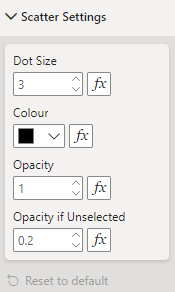
Apart from Show Group Text, each setting can also be configured using conditional formatting, allowing for different dot sizes, colours and opacities. Colour should be set using the hex colour code.
All Settings
Dots
| Setting | Description | Default | Values |
|---|---|---|---|
| Shape | Marker shape for each point. | Circle | • Circle• Cross• Diamond• Square• Star• Triangle• Wye |
| Size | Size of each point; a circle’s radius in pixels. | 2.5 | Number from 0 to 100 |
| Colour | Fill colour of each point. | #A6A6A6 |
Colour |
| Outline Colour | Outline colour of each point. | #A6A6A6 |
Colour |
| Outline Width | Outline width of each point, in pixels. | 1 | Number from 0 to 100 |
| Default Opacity | Point opacity while nothing is selected. | 1 | Number from 0 to 1 |
| Opacity if Selected | Opacity of selected or highlighted points while a selection is active. | 1 | Number from 0 to 1 |
| Opacity if Unselected | Opacity of the other points while a selection is active. | 0.2 | Number from 0 to 1 |
Group Text
| Setting | Description | Default | Values |
|---|---|---|---|
| Show Group Text | Writes each group’s name in place of its point. | Off | On or Off |
| Group Text Font | Font of the group names. | 'Arial', sans-serif |
Font family |
| Group Text Size | Font size of the group names, in pixels. | 10 | Number from 0 to 100 |
| Group Text Colour | Colour of the group names. | #000000 |
Colour |
| Group Text Default Opacity | Opacity of the group names while nothing is selected. | 1 | Number from 0 to 1 |
| Group Text Opacity if Selected | Opacity of selected group names while a selection is active. | 1 | Number from 0 to 1 |
| Group Text Opacity if Unselected | Opacity of the other group names while a selection is active. | 0.2 | Number from 0 to 1 |